

Sử dụng back-end PHP Laravel API để Upload Multiple Files và đính kèm files vào task sử dụng Teamwork API có thể gây nhiều rắc rối. Bài viết này sẽ hướng dẫn thiết lập API, tương thích với Teamwork API, thiết lập Feature Test và ví dụ trên Postman

Upload Multiple Files sử dụng File uploading via the API (Classic)
Bước đầu tiên, thiết lập API route trong file api.php, với phương thức POST:
                # Uploading Files
                # POST - /teamwork/uploading-files
                Route::post('uploading-files',
                [
                    TeamworkController::class,
                    'uploadingFiles'
                ])->name('uploading-files');
Tiếp theo, trong phần Controller, chỉ là các logic đơn giản như bên dưới, mình cần phải ẩn một số thông số vì lý do thông tin bảo mật cho dự án:
    public function uploadingFiles(
        UploadingFilesRequest $request
    ): Response
    {
        try {
            $files = $request->file('files');

            $teamworkUrl = env('TEAMWORK_URL', 'YOUR_TEAMWORK_URL_HERE');
            $teamworkEndpointFirstStep = "{$teamworkUrl}/pendingFiles.json";
            $teamworkUserServiceRequestProjectId = env('TEAMWORK_USER_SERVICE_REQUEST_PROJECT_ID', YOUR_PROJECT_ID_HERE);
            $teamworkEndpointSecondStep = "{$teamworkUrl}/projects/{$teamworkUserServiceRequestProjectId}/files.json";

            $authorization = 'Basic ' . base64_encode(env('TEAMWORK_API_TOKEN', 'YOUR_TOKEN_HERE'));

            $result = [];
            foreach ($files as $index => $file) {
                $fileName = $file['file']->getClientOriginalName();
                $filePath = $file['file']->getPathname();
                $preSigned = Http::withHeaders(
                    [
                        'Authorization' => $authorization,
                    ]
                )->attach('file',file_get_contents($filePath),$fileName)->post($teamworkEndpointFirstStep);

                $fileRef = json_decode($preSigned->body())->pendingFile->ref;

                $data = [
                        'description' => $fileName,
                        'pendingFileRef' => $fileRef,
                ];

                $response = Http::withHeaders(
                    [
                        'Authorization' => $authorization,
                    ]
                )->post($teamworkEndpointSecondStep,[
                    'file' => $data
                ]);

                $result[$index] = json_decode($response,TRUE)['fileId'];
            }
            return response_success($result);
        } catch (Exception $e) {
            return response_error("[Teamwork Controller] Upload Files Function - {$e}");
        }
    }
Lưu ý: API File uploading via the API (Preferred) https://apidocs.teamwork.com/docs/teamwork/d29b91f3e6558-file-uploading-via-the-api-preferred hoàn toàn không work sau khi mình thử nhiều cách với phương thức mình sử dụng, nhưng sử dụng Javascript thì hoạt động ổn. Vì vậy, chúng ta phải sử dụng: File uploading via the API (Classic): https://apidocs.teamwork.com/docs/teamwork/86ecebd6161af-file-uploading-via-the-api-classic
Theo như sự hỗ trợ từ phía Teamwork Support thì:
Unfortunately we’ve lost our API Support Team and I’ll be stepping in here from our Technical Services team to assist.
For Classic Upload; https://apidocs.teamwork.com/docs/teamwork/86ecebd6161af-file-uploading-via-the-api-classic
Step 1 – Create a Pending File Handle
The first thing to do is to get the actual file uploaded to Teamwork .
To do this you make an API Call to POST /pendingFiles.json. The actual file contents are sent via a form field called “file”.If this was successful you will receive a Status Code of 201 (Created) and a structure containing a reference code.
{ “pendingFile”: { “ref” : “tf_xxxxxxxxxxxxxxxx” } }The ref bit is the important part and is the Pending File Handle
Step 2 – Create an actual file object using the Pending File Handle
The next step is to create the actual file object in a project on your Teamwork account.
To do this you make an API Call to POST /projects/{id}/files.json where {id} is the ID of the project you want to create the file in.
{
“file”: {
“description”: “Optional string describing the file”,
“category-id”: “ID of the category you to create the file in. Pass 0 if no category”,
“category-name”: “String if you want to create a new category – Pass category-id=0 also”,
“pendingFileRef”: “tf_xxxxxxxxxxxxxxxx”
}
}In the JSON packet above you substitute the Pending File Ref you received back from the POST /pendingFiles.json API Call in Step 1.
Teamwork API Team Support
Ngoài ra, chúng ta cũng cần thiết lập Request UploadingFilesRequest như bên dưới:
    public function rules(): array
    {
        return [
            'files' => 'required|array',
            'files.*.file' => 'required',
        ];
    }


    /**
     * Body Parameters of this form
     *
     * @return array
     */
    final public function bodyParameters(): array
    {
        return [
            'files' => [
                'description' => 'The array file of this meeting',
                'example' => [],
            ],
            'files.*.file' => [
                'description' => 'The file need to upload',
            ],
        ];
    }
Dễ dàng nhận thấy rằng, dạng files upload lên sẽ là:
files[]
files[0][file]
files[1][file]
...
Tiếp theo, chúng ta viết Feature Test, ý tưởng là test về permission và test upload 2 files lên Teamwork:
    public function testTeamworkUploadFiles()
    {
        $apiPath = self::API_PATH . "/uploading-files";
        $company = Company::query()
            ->inRandomOrder()
            ->first();
        $user = $company->owner;

        # Unauthenticated
        $response = $this->post($apiPath);
        $response->assertUnauthorized()
            ->assertJson(TestConstant::JSON_UNAUTHENTICATED);

        # Successfully
        # Company
        Storage::fake('files');
        $files = [];
        $files[0]['file'] = UploadedFile::fake()
            ->createWithContent("test-1.pdf", 'abc');

        $files[1]['file'] = UploadedFile::fake()
            ->createWithContent("test-2.pdf", 'abc');
        $data = [
            'files' => $files,
        ];
        # Successfully
        $response = $this->actingAs($user, 'api')
            ->post($apiPath, $data);

        $response->assertSuccessful()
            ->assertJson(TestConstant::JSON_SUCCESS)
            ->assertJsonStructure(TestConstant::JSON_STRUCTURE_VALUES);
    }
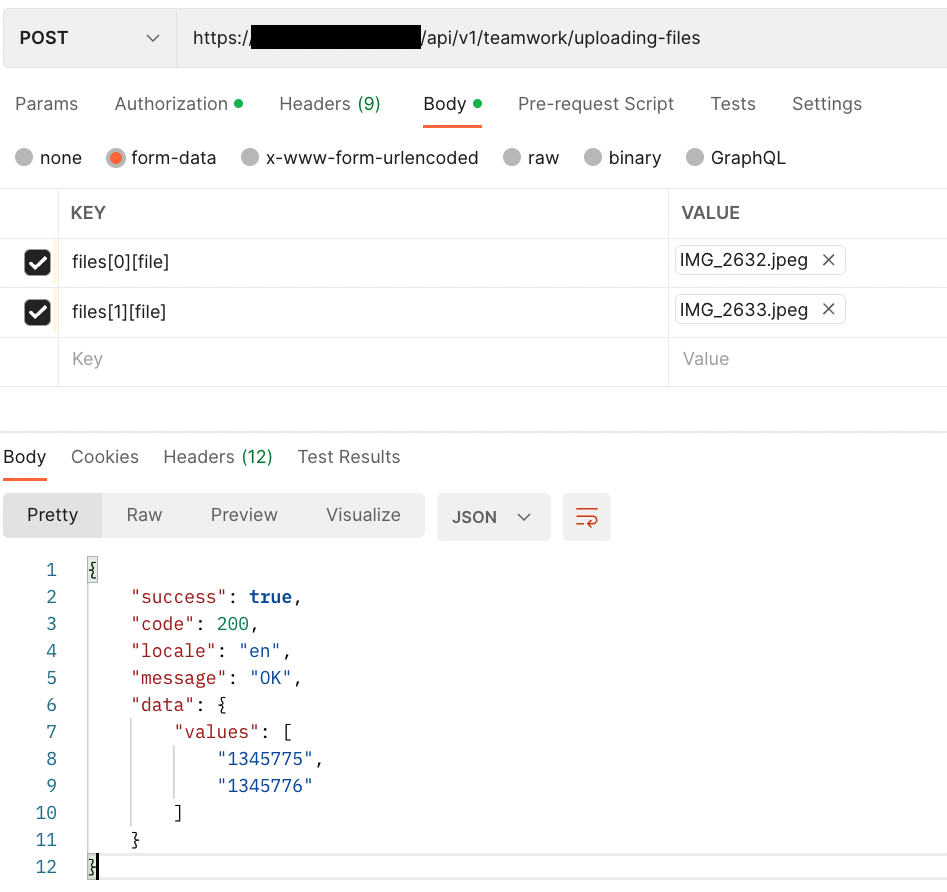
Cuối cùng, chúng ta sẽ test trên Postman để gửi ví dụ này cho Front-end Team hoặc các bên đối tác khác.
Điểm lưu ý ở đây là key của form phải là: files[0][file], thay vì chỉ là files hoặc files[0].file:
Tạo task trên Teamwork đính kèm files đã upload với API Create a Task
Đầu tiên, thiết lập API trên Laravel:
                # Create Additional Service Task
                # POST - /teamwork/additional-services
                Route::post('additional-service',
                [
                    TeamworkController::class,
                    'createAdditionalService'
                ])->name('additional-service');
Tiếp theo, viết logic trong Controller (không sử dụng Service để tiết kiệm thời gian, mặc dù không phải là best practice), chúng ta sẽ sử dụng Teamwork API https://apidocs.teamwork.com/docs/teamwork/cd8948166b1b1-create-a-task
    final public function createAdditionalService(
        CreateAdditionalServiceRequest $request
    ): Response {
        try {
            $teamworkUrl = env('TEAMWORK_URL', 'YOUR_URL_HERE');
            $teamworkUserServiceInboxTaskListId = env('TEAMWORK_USER_SERVICE_INBOX_TASK_LIST_ID',YOUR_LIST_ID_HERE);
            $teamworkEndpoint = "{$teamworkUrl}/tasklists/{$teamworkUserServiceInboxTaskListId}/tasks.json";
            $authorization = 'Basic ' . base64_encode(env('TEAMWORK_API_TOKEN', 'YOUR_TOKEN_HERE'));
            $data = [
                "todo-item" => [
                    "content" => env('APP_ENV','unknown') . " - " . $request->input('content'),
                    "description" => $request->input('description'),
                    "notify" => env('TEAMWORK_NOTIFY',FALSE),
                    "responsible-party-id" => env('TEAMWORK_RESPONSIBLE_PARTY_ID_USER_SERVICE_REQUEST',"YOUR_RESPONSIBLE_PARTY_ID_HERE"),
                    "attachments" => $request->input('attachments') ?? ""
                ]
            ];

            $response = Http::withHeaders(
                [
                    'Authorization' => $authorization,
                ]
            )->post($teamworkEndpoint, $data);

            return response_success(json_decode($response, true));
        } catch (Exception $e) {
            return response_error("[Teamwork Controller] Create Additional Service On Teamwork Function - {$e}");
        }
    }
File Request CreateAdditionalServiceRequest
    public function rules(): array
    {
        return [
            'content' => 'required|string',
            'description' => 'required|string',
            'attachments' => 'nullable|string',
        ];
    }

    /**
     * Body Parameters of this form
     *
     * @return array
     */
    final public function bodyParameters(): array
    {
        return [
            'content' => [
                'description' => 'The title of a Teamwork Task',
                'example' => 'Nick has requested for Perform a capital increase',
            ],
            'description' => [
                'description' => 'The description of a Teamwork Task',
                'example' => '#### Requester\n          \n * Nick\n        \n\n#### Order Data\n',
            ],
            'attachments' => [
                'description' => 'The file Id(s) attached to a Teamwork Task, refer to API Teamwork Upload Files',
                'example' => "1343151,1343152"
            ]
        ];
    }
Theo như hướng dẫn từ tài liệu của Teamwork How do I upload a file with the API? https://apidocs.teamwork.com/docs/teamwork/f92e3220710ec-how-do-i-upload-a-file-with-the-api, họ hướng dẫn đính kèm files với field tên là “pendingFileAttachments“, tuy nhiên, field này chỉ sử dụng cho API File uploading via the API (Preferred): https://apidocs.teamwork.com/docs/teamwork/d29b91f3e6558-file-uploading-via-the-api-preferred.
Để sử dụng đúng, chúng ta phải dùng field “attachments” đi cùng với API File uploading via the API (Classic) https://apidocs.teamwork.com/docs/teamwork/86ecebd6161af-file-uploading-via-the-api-classic, data gửi lên sẽ có dạng: “file_id_1,file_id_2”, tương ứng với ví dụ ở trên thì chúng ta phải lấy giá trị “values” và sử dụng built-in function implode của PHP để nối chuỗi nếu sử dụng Feature Test như bên dưới:
    public function testCreateAdditionalService()
    {
        $apiPath = self::API_PATH . "/additional-service";
        $company = Company::query()
            ->inRandomOrder()
            ->first();
        $user = $company->owner;

        # Unauthenticated
        $response = $this->post($apiPath);
        $response->assertUnauthorized()
            ->assertJson(TestConstant::JSON_UNAUTHENTICATED);

        # Successfully
        $request = [
            "content" => "{$company->name} has requested for Perform a capital increase",
            "description" => "test",
        ];

        $response = $this->actingAs($user, 'api')
            ->post($apiPath, $request);

        $response->assertSuccessful()
            ->assertJson(
                array_merge(
                    TestConstant::JSON_SUCCESS,
                    [
                        'data' => [
                            'STATUS' => 'OK',
                        ]
                    ]
                )
            )
            ->assertJsonStructure(
                array_merge(
                    TestConstant::JSON_STRUCTURE,
                    [
                        'data' => [
                            'affectedTaskIds',
                            'id',
                            'STATUS',
                        ]
                    ]
                )
            );

        # Successfully with Files
        Storage::fake('files');
        $files = [];
        $files[0]['file'] = UploadedFile::fake()
            ->createWithContent("test-1.pdf", 'abc');

        $files[1]['file'] = UploadedFile::fake()
            ->createWithContent("test-2.pdf", 'def');
        $data = [
            'files' => $files,
        ];

        $uploadFilesApiPath = self::API_PATH . "/uploading-files";
        $filesUploaded = $this->actingAs($user, 'api')
            ->post($uploadFilesApiPath, $data);
        $fileIds = implode(",", $filesUploaded['data']['values']);

        $request = [
            "content" => "{$company->name} has requested for Perform a capital increase",
            "description" => "test",
            "attachments" => $fileIds,
        ];

        $response = $this->actingAs($user, 'api')
            ->post($apiPath, $request);

        $response->assertSuccessful()
            ->assertJson(
                array_merge(
                    TestConstant::JSON_SUCCESS,
                    [
                        'data' => [
                            'STATUS' => 'OK',
                        ]
                    ]
                )
            )
            ->assertJsonStructure(
                array_merge(
                    TestConstant::JSON_STRUCTURE,
                    [
                        'data' => [
                            'affectedTaskIds',
                            'id',
                            'STATUS',
                        ]
                    ]
                )
            );
    }
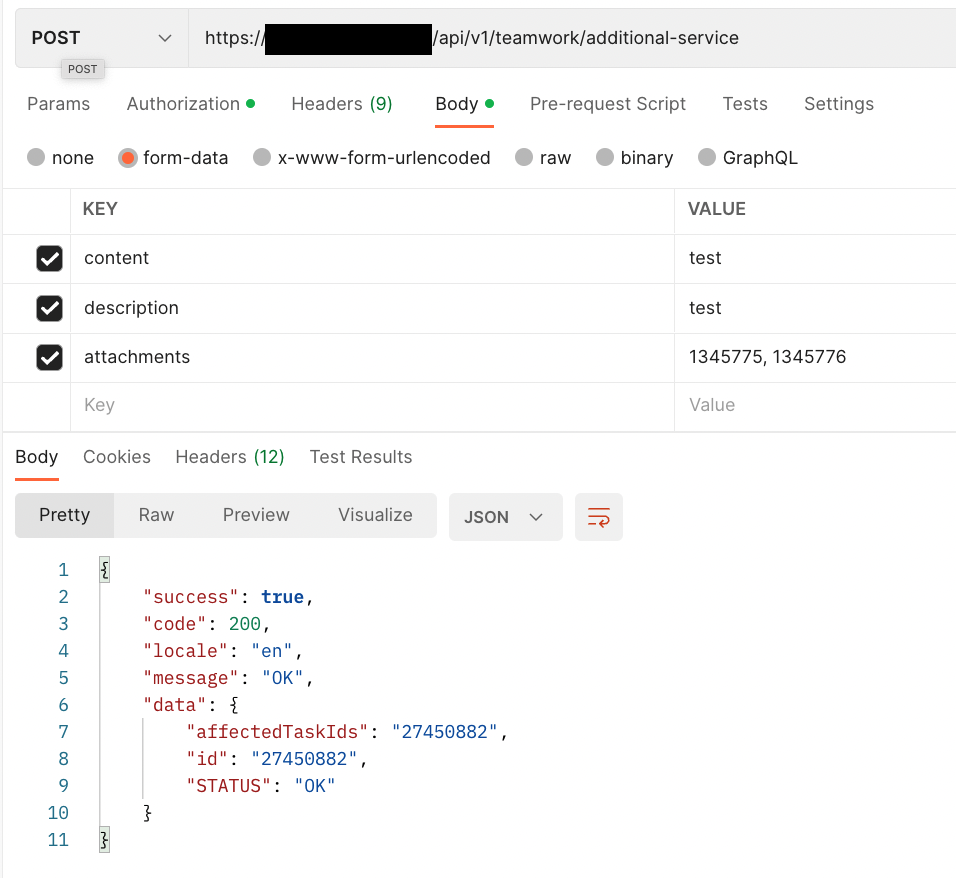
Logic của test sẽ là: test permission, test tạo task không có files đi kèm, test tạo task với files đi kèm và phải lưu ý về attachments field, test Postman như bên dưới:
Vì tài liệu của Teamwork API không rõ ràng cũng như các thiếu sự hỗ trợ rất nhiều nên team mình đã gặp một số khó khăn với Teamwork API như các lỗi bên dưới khi sử dụng API File uploading via the API (Preferred):
“value”: “Something went wrong: GuzzleHttp\Exception\ClientException: Client error: `PUT https://tw-bucket.s3-accelerate.amazonaws.com
“value”: “Something went wrong: Illuminate\\Http\\Client\\RequestException: HTTP request returned status code 403:\n<?xml version=\”1.0\” encoding=\”UTF-8\”?>\n<Error><Code>SignatureDoesNotMatch</Code><Message>The request signature we calcul (truncated…)\n
Lỗi này có thể là do phía tương thích với AWS S3 signature mà package HTTP của Laravel hoặc thậm chí là curl đều không thể gửi files lên được.

Undeniably imagine that that you said. Your favourite reason appeared to be on the web the simplest factor to remember of. I say to you, I definitely get irked while other folks consider concerns that they plainly do not recognize about. You managed to hit the nail upon the top as well as defined out the whole thing with no need side effect , other folks can take a signal. Will probably be again to get more. Thanks
fz07le
Thanks for your fascinating article. One other problem is that mesothelioma is generally due to the breathing of fibres from asbestos, which is a extremely dangerous material. It truly is commonly viewed among laborers in the structure industry who may have long contact with asbestos. It’s also caused by living in asbestos covered buildings for an extended time of time, Family genes plays a huge role, and some people are more vulnerable to the risk as compared with others.
I?ve recently started a site, the information you provide on this web site has helped me tremendously. Thanks for all of your time & work.
Thanks for your article on the vacation industry. We would also like to add that if you’re a senior contemplating traveling, it can be absolutely vital that you buy traveling insurance for retirees. When traveling, older persons are at biggest risk being in need of a professional medical emergency. Having the right insurance cover package to your age group can safeguard your health and provide you with peace of mind.
Эвакуатор авто Мы располагаем парком спецтехники, способной справиться с любыми задачами.
записаться онлайн на тату Начните свой бизнес с LANDSHI.RU по всей России! Платформа для мастеров красоты по всей России: онлайн-запись, продвижение в выбранном городе и выгодные тарифы. Всё, что нужно, чтобы клиенты находили вас. Для мастеров и салонов: создание профиля, публикация услуг, управление расписанием, приём записей, оформление и оплата подписки.Платформа LANDSHI работает связующем звеном, которое помогает клиентам найти подходящих для себя мастеров, а мастерам максимальное количество клиентов в сфере салонов красоты и барбершопов. LANDSHI — это сервис, который позволяет: находить мастеров и салоны красоты, просматривать услуги, цены и отзывы, записываться на приём и управлять своими записями онлайн 24/7.Основные возможности для клиентов: быстрый поиск специалистов, запись на услуги, управление визитами.
https://ruwest.ru/interview/156837/
I?ve recently started a site, the information you offer on this website has helped me tremendously. Thanks for all of your time & work.
I absolutely love your blog and find most of your post’s to be just what I’m looking for. Would you offer guest writers to write content in your case? I wouldn’t mind publishing a post or elaborating on a lot of the subjects you write about here. Again, awesome web log!
https://share.google/q1y16vI3mjIvVkzxN
печать пакетов шелкографией Вам больше не нужно искать, мы здесь, чтобы помочь!
https://ento.mn/2019/07/08/%d1%86%d0%b8%d1%81%d1%82%d0%b8%d1%82-%d0%b1%d1%83%d1%8e%d1%83-%d1%88%d1%8d%d1%8d%d1%81-%d0%b4%d0%b0%d0%bc%d0%b6%d1%83%d1%83%d0%bb%d0%b0%d1%85-%d0%b7%d0%b0%d0%bc%d1%8b%d0%bd-%d1%85%d0%b0%d0%bb%d0%b4/
I have noticed that credit score improvement activity needs to be conducted with tactics. If not, you might find yourself destroying your rank. In order to grow into success fixing your credit history you have to ascertain that from this time you pay your monthly expenses promptly before their booked date. It is really significant given that by not accomplishing this, all other measures that you will take to improve your credit positioning will not be useful. Thanks for sharing your concepts.
What i do not understood is in truth how you’re now not actually a lot more well-liked than you may be now. You are so intelligent. You recognize therefore significantly in terms of this topic, produced me for my part imagine it from a lot of numerous angles. Its like men and women aren’t involved until it?s something to accomplish with Woman gaga! Your personal stuffs excellent. Always care for it up!